I have been playing with pxe booting for a while, first starting with pxelinux, then gpxe and lately with ipxe.
I am mostly a windows user and as an IT often needs a quick (=no install) and portable (=run from USB) dhcp server including a tftp server and a http server offering me then pxe booting.
I could use tftp32 or serva but i like to make my own tools and these 2 were missing some features here and there.
So here comes a small portable dhcp server including a tftp and a http server.
This is freeware (and will always be), should be opensource and the unique here idea is to share and contribute.
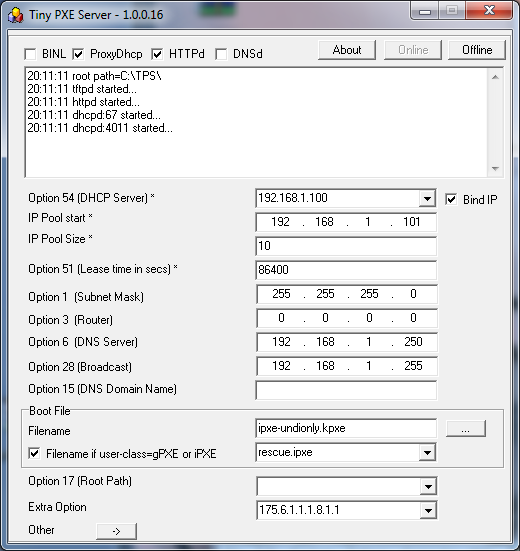
- dhcp daemon supports an alternative filename based on the user-class thus enabling chainloading (gpxe->pxelinux, ipxe->script, etc), and also support settings dhcp options (which can then be used by your boot loader)
- tftp daemon supports tsize and blksize commands.
- http daemon support head, range (mandatory for ipxe sanboot options) and over 2gb iso.
- new in version 1.0.0.7 : BINL (RIS and WDS) support
- new in version 1.0.0.10 : DNS daemon
- new in version 1.0.0.14 : ProxyDHCP option
The root home of tftp and http is the folder where you main pxe loader sits.
I put all my iso files in a sub folder called images.
I put all my wim files in a sub folder called sources.
I put all my other loaders, in case I want to chain load, in next to my main loader (bootmgr, pxelinux, gpxe, grldr, etc)
In the attached screenshot, i load ipxe then chainloads a script (menu.ipxe).
In the script 3 different methods : the classic memdisk, a newer approach with sanboot and a new kid on the block wimboot.
More info about these loading methods here :
PACKAGE NOTES
