Bulk Crap Uninstaller 4.12.2

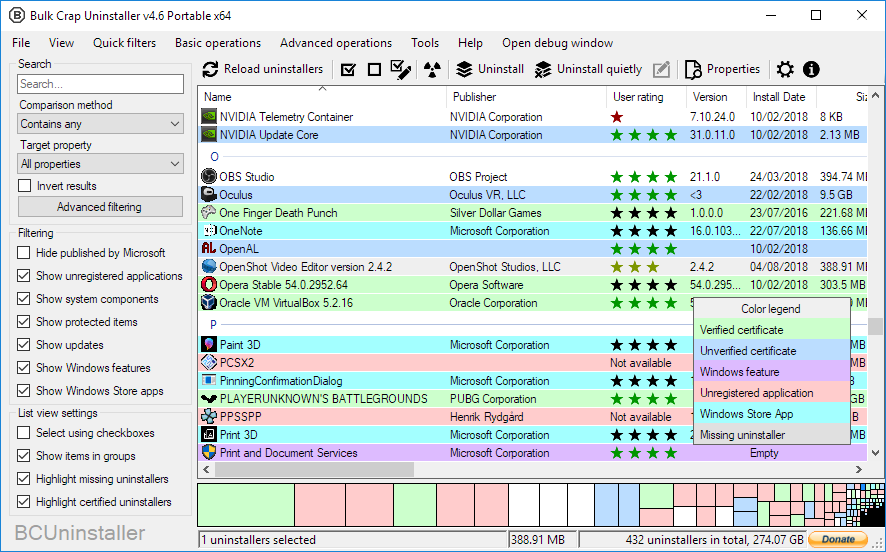
Bulk Crap Uninstaller is a free (as in speech) program uninstaller. It excels at removing large amounts of applications with minimal user input. It can clean up leftovers, detect orphaned applications, run uninstallers according to premade lists, and much more!
Even though BCU was made with IT pros in mind, by default it is so straight-forward that anyone can use it effortlessly!
Features
Detect, manage and quietly uninstall
- Normal registered applications (same as Programs and Features and many other uninstallers)
- Hidden/protected registered applications
- Applications with damaged or missing uninstallers
- Portable applications (might have to point BCU where to look)
- Chocolatey packages
- Oculus games/apps
- Steam games/apps
- Windows Features
- Windows Store apps (Universal Windows Platform apps)
- Windows Updates
Fast, automatic uninstall
- Uninstall any number of applications in a single batch
- Minimal to no user input is required during uninstallation
- Uninstall multiple items at once to speed up the process (with collision prevention)
- Console interface can automatically uninstall applications based on conditions with no user input
- Quietly uninstall many uninstallers that don’t support silent uninstallation
- Uninstall applications even if they don’t have any uninstallers
- Uninstall applications by window, shortcut or directory
- Can handle crashing and hanging uninstallers
Other features
- Find and remove leftovers after uninstallation
- Clean Program Files directories from unused or empty folders
- Manually uninstall any application, bypasing it’s uninstaller (Force uninstall)
- Startup manager
- Application ratings
- Huge amount of data about applications is collected and displayed. User can freely browse, filter and export everything
- Filtering with common presets or based on fully custom rules with Regex support
- Verification of uninstaller certificates
- Large amount of configurability
- Can run user-specified commands before and after uninstalling
- Can run on .Net 4.0 or newer, or, if not available, on .Net 3.5 with reduced functionality
- Fully portable, settings are saved to a single file
Bilang ng pag download: 23 662
Size: 4.8 MB
Petsa ng pag update: 28.01.2019
Proyekto sa pamamahagi: walang bayad na software
Operation Systems: Windows 7 x64, Windows 8 x64,
Windows 8.1 x64, Windows 10 x64, Windows 11 x64
Windows 8.1 x64, Windows 10 x64, Windows 11 x64